Smolpad 1.3.7: tables, an Apple Watch app, and pCloud sync
Smolpad had two releases in September. 1.3.6 gave it a daily note. 1.3.7 gives it tables, a watch app, two more places to keep your files, and a long list of smaller things. Here is what changed, and where to find each piece.
Tables
What was the most asked-for thing on the feedback board? Tables. By a distance.
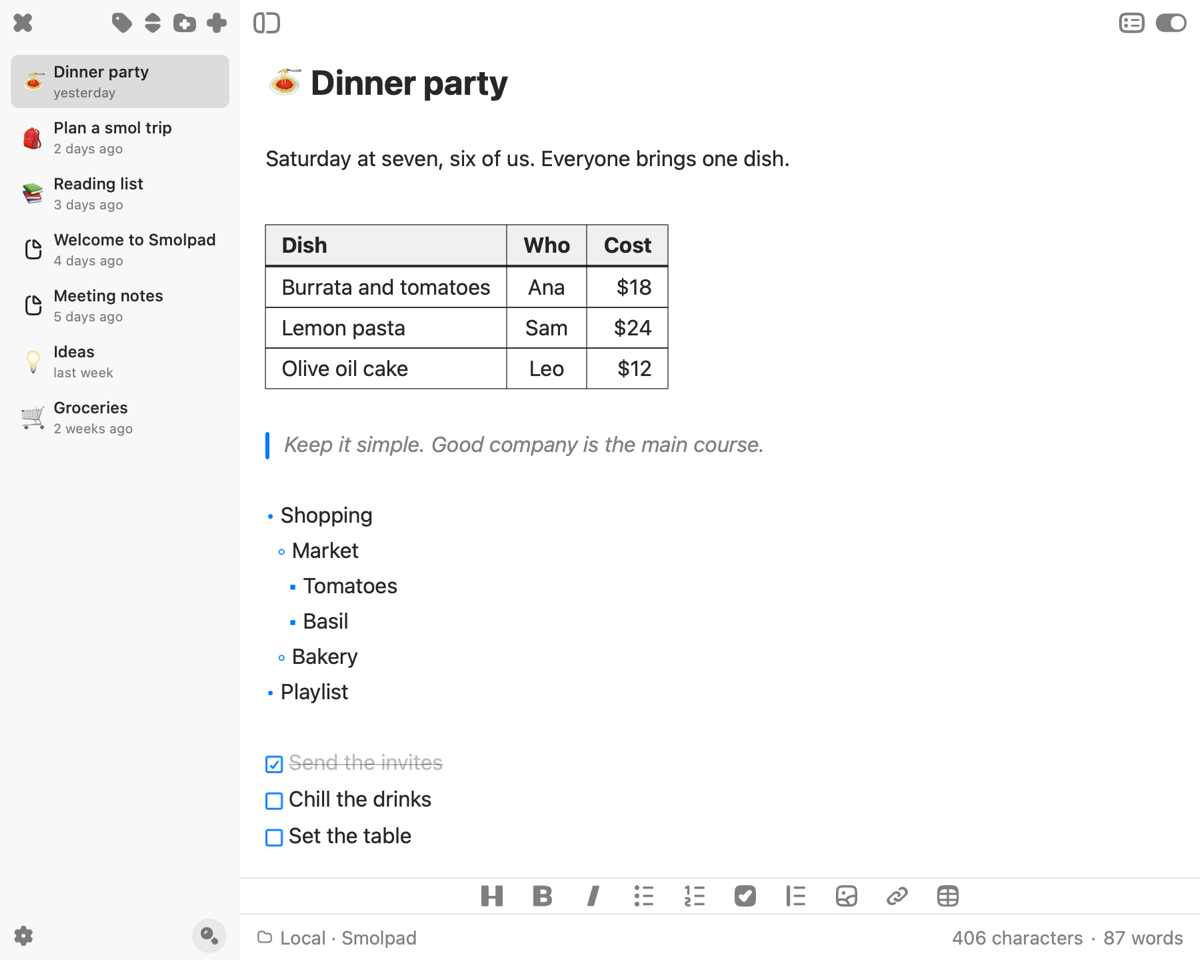
A Markdown table is a grid drawn with pipes, and until now Smolpad showed you exactly that: lines of text with | in them, and the columns left for you to keep in your head. Now a table reads as a grid as you write. Every row sits in the code font, the pipes and the divider row dim, and the header goes bold. Tab moves to the next cell, Return adds a row, and a new Table button on the formatting bar starts one.
Paste a table from a chat and it lines up on arrival.
With Hide Markdown syntax on, the table draws as a real table in your editor font, in one of four styles: Default, Lines, Striped and Accent. The file is still pipes and dashes underneath, which is the point. Open it in any other editor and the table is still there.
Settings › Editor › Customize Editor picks the table style, and Hide Markdown syntax is on the same page. The switch at the top of the editor flips it without the trip to Settings. Tables are in the free tier, like every editing feature.
Your notes on your wrist
Smolpad is on the Apple Watch now.
Your notes, in the same order as on your iPhone, with headings, lists and quotes intact. Check off a task on your wrist and it is checked in the note. New Note starts a note by dictation, Scribble or the keyboard, and Add Text puts a paragraph at the end of any note. The watch works through your iPhone and keeps your changes while the iPhone is out of reach.
The grocery list is the obvious one. Write it on the Mac, check it off in the store with your phone still in your pocket.
Two complications for the watch face: Open Smolpad, and Open Note for a note of your choosing.
The watch app is part of Smolpad Pro. It comes with the iPhone app. If it does not show up on the watch on its own, open the Watch app on your iPhone and install it from Available Apps.
Two more places to sync
Where do your notes live? With Smolpad the answer has always been a folder of .md files in your own iCloud or Dropbox. 1.3.7 adds pCloud and Google Drive.
Connect signs you in on the service's own site, copies your iCloud notes over, and from then on Smolpad keeps your notes as plain Markdown files in a Smolpad folder of your own, synced both ways on every device. Neither service shows Smolpad anything else in your account.
Under each account a line now says what the sync is doing: green with the note count and the last sync time, blue while it runs, amber with the reason when it could not. Dropbox copies your iCloud notes over on connecting now too.
Settings › Storage has two more cards beside iCloud and Dropbox. pCloud and Google Drive are part of Smolpad Pro.
One note a day
1.3.6 gave Smolpad a daily note. Turn it on and the app keeps one note per calendar day, named by its date in the format you pick, in a Daily folder. The note list gets a calendar: days with a note carry a dot, and tapping any day opens its note, past or future.
I wrote about the capture habit here in September. A daily note is that habit with the filing decision taken out. Today's thought goes in today's note. Tomorrow gets its own.
1.3.7 makes today's note reachable from more places. On the Mac, Control-Option-Command-T appends whatever text is selected in the front app to the end of today's note, and a notification says what landed. On the iPhone there are five Lock Screen widgets: Search, Daily Note, Open Note, New Note and Open Smolpad, and Open Note comes in a wider size that shows a note's first lines. Five actions appear in the Shortcuts app with no setup: Open Today's Note, Open Note, New Note, Append to Note and Search Notes. Your notes show up in Spotlight, and with Apple Intelligence, Siri knows which note is on your screen.
Daily note is in Settings › General, and the Mac shortcut can be changed or cleared under Settings › General › Shortcut. The Lock Screen widgets are part of Smolpad Pro; the daily note and the Shortcuts actions that open and search are free.
Settings that follow you
Set up the daily note, your themes and the rest once, and every Mac, iPhone and iPad on the same iCloud account picks them up, a fresh install included. Keyboard shortcuts, font size, appearance, the app icon and window sizes stay with each device.
Settings › General › Sync settings with iCloud turns it off.
The smaller things
Archive. Right-click a note on the Mac, or touch and hold it on iPhone and iPad, choose Archive, and it moves into an Archive folder instead of being deleted. A swipe left can archive instead of delete, if you set it to in Settings › General › Notes.
More Markdown. Quotes with a bar in your theme's accent color, nested bullets that look nested, footnotes, definition lists, ==highlights==, and code blocks colored in nine languages. Write [[Note title]] and it becomes a link that opens that note; type [[ and Smolpad offers your notes. Type :tent: and it becomes the tent emoji, and a title that starts with an emoji shows it as the note's icon in the list.
Two more themes. Doki Sayori, a pale sky blue, and Doki Vanilla, a slate violet. Twenty-nine in all.
Export. A note, or just a selection, as PDF, HTML or Rich Text, set in your editor font. Copy as Rich Text, Print, and Send to Apple Notes on the Mac, or Share on iPhone and iPad. Export is part of Smolpad Pro.
Under the hood
Smolpad opens without freezing on a big library: notes load in the background, so a big library, or notes iCloud has not downloaded yet, no longer hold the app on an empty list. Sync no longer makes conflicted copies of your own edits after a dropped connection, and when two devices truly clash, iCloud keeps both versions. Leaving a note with the keyboard up no longer freezes or crashes some iPhones.
The full list, every version, is on the release notes page.
Smolpad Pro is $1.49 a month or $14.99 a year, with the first week free. The free tier is still free, and tables are in it.
Update, open a note, and draw a table. Then put the grocery list on your wrist.
Smolpad is a tiny Markdown editor for Mac, iPhone, and iPad. It lives in your Mac's menu bar, opens on a keystroke, and keeps every note as a plain .md file in your own iCloud or Dropbox. Free for your first ten notes, with every editing feature included.