Smolpad 1.3.9: ready for iPhone Duo
iPhone Duo goes on sale today, October 23. Smolpad 1.3.9 works on it, and 1.3.9 is out now on iPhone, iPad and the Mac.
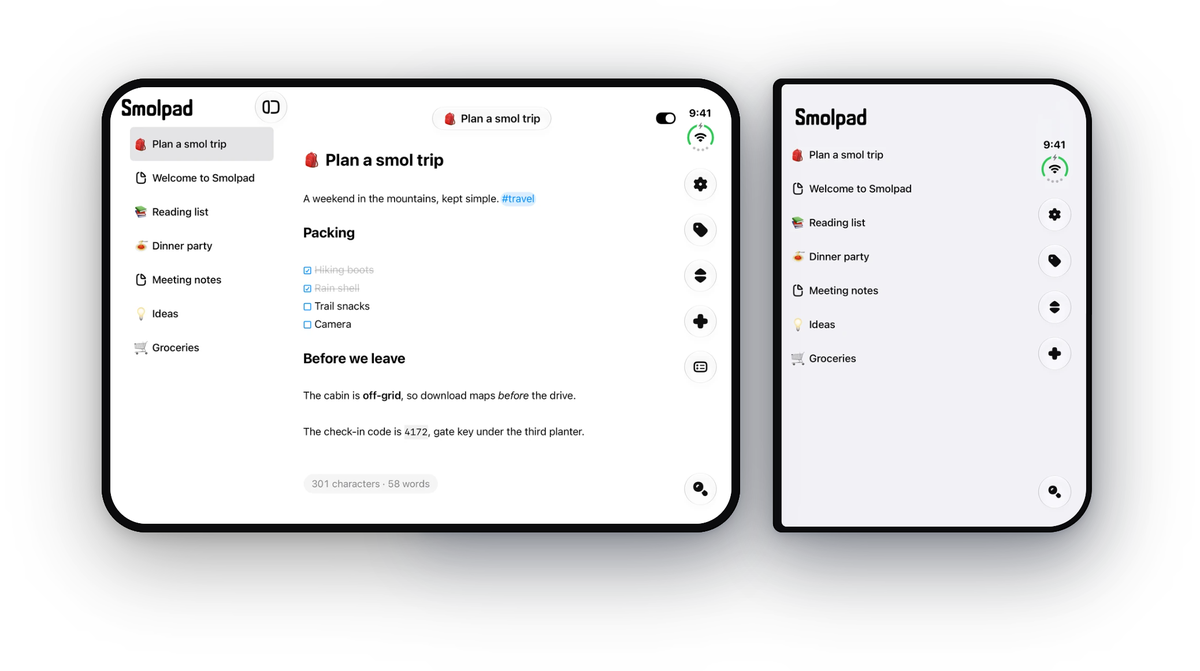
iPhone Duo
Open Duo, and your notes sit beside the one you're writing. Unfolded, you get the two columns you know from iPad: your note list on the left, the note on the right.
Jump from the packing list to the grocery list without backing out of anything. Folded, Smolpad is the iPhone app it always was, on the cover screen.
The layout follows the window, not the device. A window wide enough for two columns gets two, which is why the two-column layout was in the app from 1.3.5, before any phone could show it.
The Trash
Deleting a note now moves it to the Trash, a folder inside your notes folder, instead of erasing it. The Trash shows up under your folders whenever something is in it, with the day each note was deleted and where it came from.
Touch and hold a note there, or right-click it on the Mac, to Restore it to its folder. The Trash syncs to your other devices like everything else.
Note history
A paragraph you wrote over, or text a sync replaced, can come back. Choose History on any note to see its earlier versions by date and time, read any of them, and restore the one you want.
Restoring saves the current text as a version first, so a restore can be undone the same way.
History is on a note's menu: touch and hold the note on iPhone and iPad, or right-click it on the Mac. The versions are plain text files in a hidden .smolpad folder inside your notes folder, so they sync with your notes. History is free.
The smaller things
- Select several notes. On the Mac, Command-click notes and right-click for actions. On iPhone and iPad, Sort, then Select Notes, then move, export or delete them together.
- Check for changes. Pull the note list down on iPhone and iPad, or press Command-R on the Mac, and Smolpad asks your storage for anything new right then.
- Tiny5. A pixel font for the editor, in Settings › Editor › Font.
- Home Screen widgets. A note on your Home Screen, or the Quick Actions widget. Part of Smolpad Pro.
And from 1.3.8, which went out on October 6:
- An emoji picker. Type a colon and a few letters, and matching emoji appear.
- A slimmer note list. Titles only, with the last edited date a switch in Settings › General › Notes. A new install starts with it off.
- Emoji in the list. Start a note's title with an emoji and the list shows it as the note's icon.
Smolpad Pro is $1.49 a month or $14.99 a year, with the first week free. Every change is on the release notes page.
Smolpad is a tiny Markdown editor for Mac, iPhone, and iPad. It lives in your Mac's menu bar, opens on a keystroke, and keeps every note as a plain .md file in your own iCloud, Dropbox, pCloud, or Google Drive. Free for your first ten notes, with every editing feature included.