A to-do list one keystroke away
A to-do list is only as complete as the cost of reaching it allows. At one keystroke, an item goes down the moment it occurs to you. Behind an app you have to go and find, it waits for a better moment, and most of those moments never come.
The entry fee
Every list charges an entry fee: the steps between noticing a task and seeing a cursor on the list. Unlock the phone, find the app, wait for it to load, pick the right list, tap the plus. That is five steps, and each one is a chance to decide the item can wait.
The items that lose that decision are the small ones: the reply, the form, the library books. They are also most of what a week contains. A list that only catches the large items is a list of projects, and the small things go back to being carried in your head.
At one keystroke the fee is close to nothing. Writing the item down becomes cheaper than remembering it, which is the one condition under which a list stays complete. Count the steps in whatever holds your list now. Over three and items are being lost before they are written.
On the Mac, Smolpad lives in the menu bar and opens over whatever app you were in, on a global shortcut you record in Settings. ⌘K is search, and it matches titles, so the list is the shortcut and a few letters of its name away. ⌘N is a new note.
It is a file
What does a list in a plain-text note give you that a task app does not? A file. The list is a .md file in a folder, and each item is one line:
# This week
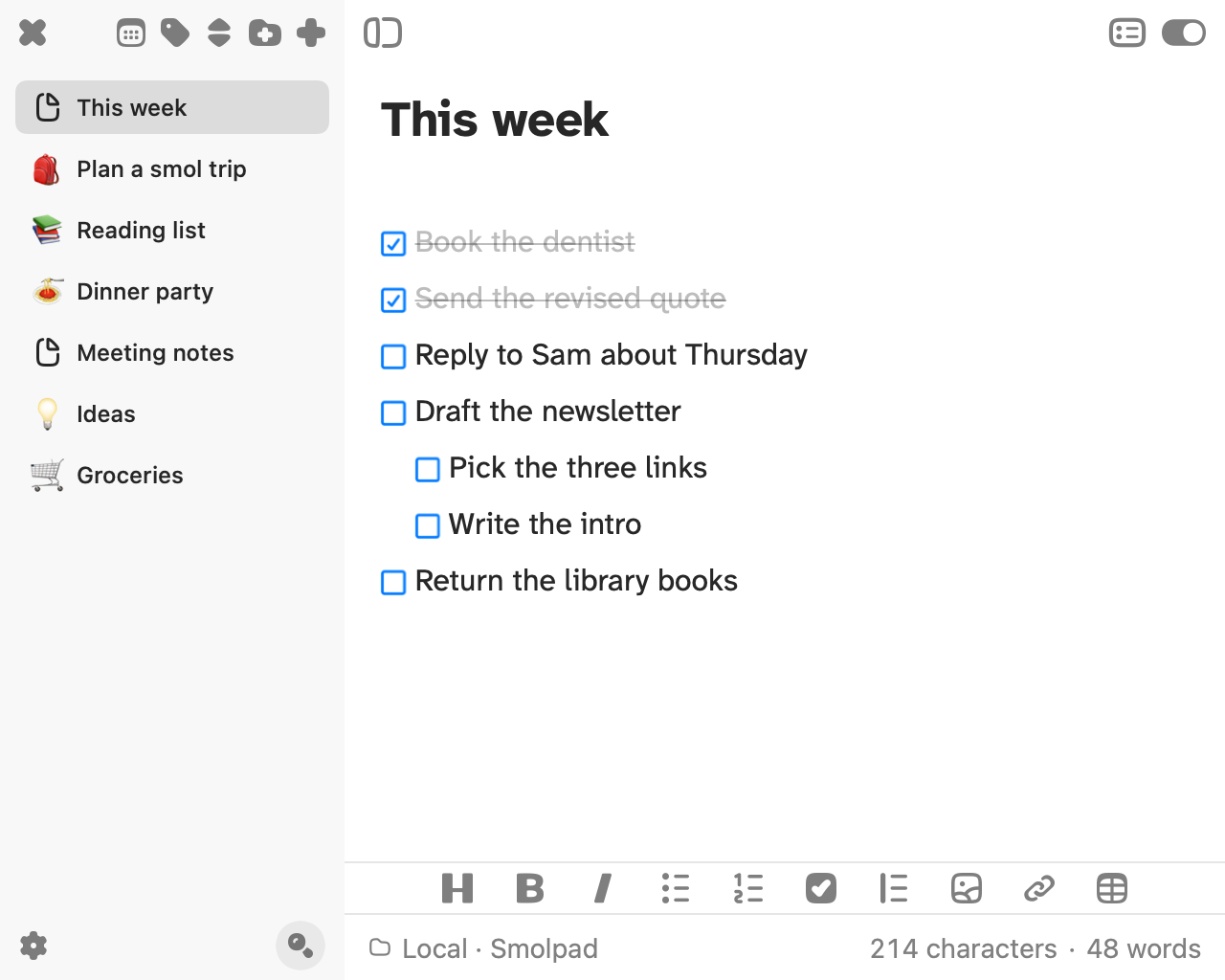
- [x] Book the dentist
- [ ] Reply to Sam about Thursday
- [ ] Return the library books
Open is - [ ], done is - [x]. Those characters read the same in any text editor, in a terminal, and in a preview pane on a computer that has never had a notes app installed.
That is what lets the list outlast the app that edits it. Remove the app and the file is still in the folder, every item and every tick where it was left. Nothing has to be exported, because nothing was ever stored anywhere else.
Select some lines and press the To-Do button on the formatting bar, on the Mac or above the keyboard on iPhone and iPad. Each line becomes a task, and a bullet or numbered item is upgraded in place. Return on a task line supplies the next box; Return on an empty box ends the list. The new box is always unchecked, even under a ticked item, because adding a line is adding work, not repeating it. On a hardware keyboard, Tab nests an item under the one above and Shift-Tab brings it back out.
One list, next actions
Keep one list. Five lists means five places to check, and a choice about where each item belongs, made at the exact moment the item should simply go down. One note, with a heading per week, gives every item the same destination.
Write the next physical action, not the project. "Newsletter" can sit on a list for a month, because it does not say where to start. "Draft the newsletter intro" does. When an item really is a project, nest its steps under it and tick them one at a time.
Capture now and sort later. Write the item at the bottom, in the words it arrived in. Rewording, reordering and deciding which day it belongs to are jobs for the review, when the list is the only thing in front of you.
Short enough to finish
What belongs on today's list? What can be finished today. A list that ends every evening with most of it undone stops being read, and an unread list is the same as no list.
Review once a day: read the list top to bottom, tick what got done in passing, and move what will not happen today to tomorrow. Prune once a week: delete what stopped mattering, which is usually more than expected, and move the one or two items that now need to interrupt you at a set time into an app that does alarms, since a box in a note has no due date and no reminder.
Tick each item in the place it was written. A done line stays in the file, struck through, so the list is a record of the day as well as a plan for it. Leave the ticks visible until the next review, then clear them.
Click or tap a box to tick it. The line strikes through and dims, and the file says - [x]. On an Apple Watch, with Smolpad Pro, a box ticked on the watch is ticked in the note. Smolpad has no due dates and no reminders.
Smolpad is a tiny Markdown editor for Mac, iPhone, and iPad. It lives in your Mac's menu bar, opens on a keystroke, and keeps every note as a plain .md file in your own iCloud, Dropbox, pCloud, or Google Drive. Free for your first ten notes, with every editing feature included.